

By 2026, the global contactless payment market is projected to surpass $16.4 trillion, yet nearly 25% of users remain unsure if their device supports the necessary hardware. You’re likely looking for a way to confirm the status of nfc on this phone so you can stop fumbling with physical cards and start using more efficient methods. It’s natural to feel concerned about digital security or confused by the overlapping settings in modern operating systems.
This guide provides the professional clarity you need to transform your device into a secure gateway for instant transactions. We’ll show you exactly how to enable your hardware and leverage it for global settlements, whether you’re using fiat or digital assets. By the end of this article, you’ll understand how to bridge the gap between your smartphone and the modern financial grid with absolute confidence. We’re moving beyond simple connectivity to explore the true Future of Payments.
Key Takeaways
- Master the essential steps to identify and activate nfc on this phone to unlock a more efficient and secure way to handle global transactions.
- Understand the technical advantages of NFC over QR codes, focusing on the sub-second transaction speeds that define the future of payments.
- Gain peace of mind by exploring how tokenization ensures your sensitive financial data is never exposed during a contactless handshake.
- Learn how to leverage NFC for instant settlements in Bitcoin and USDT, transforming your smartphone into a powerful multi-currency gateway.
How to Check if You Have NFC on This Phone
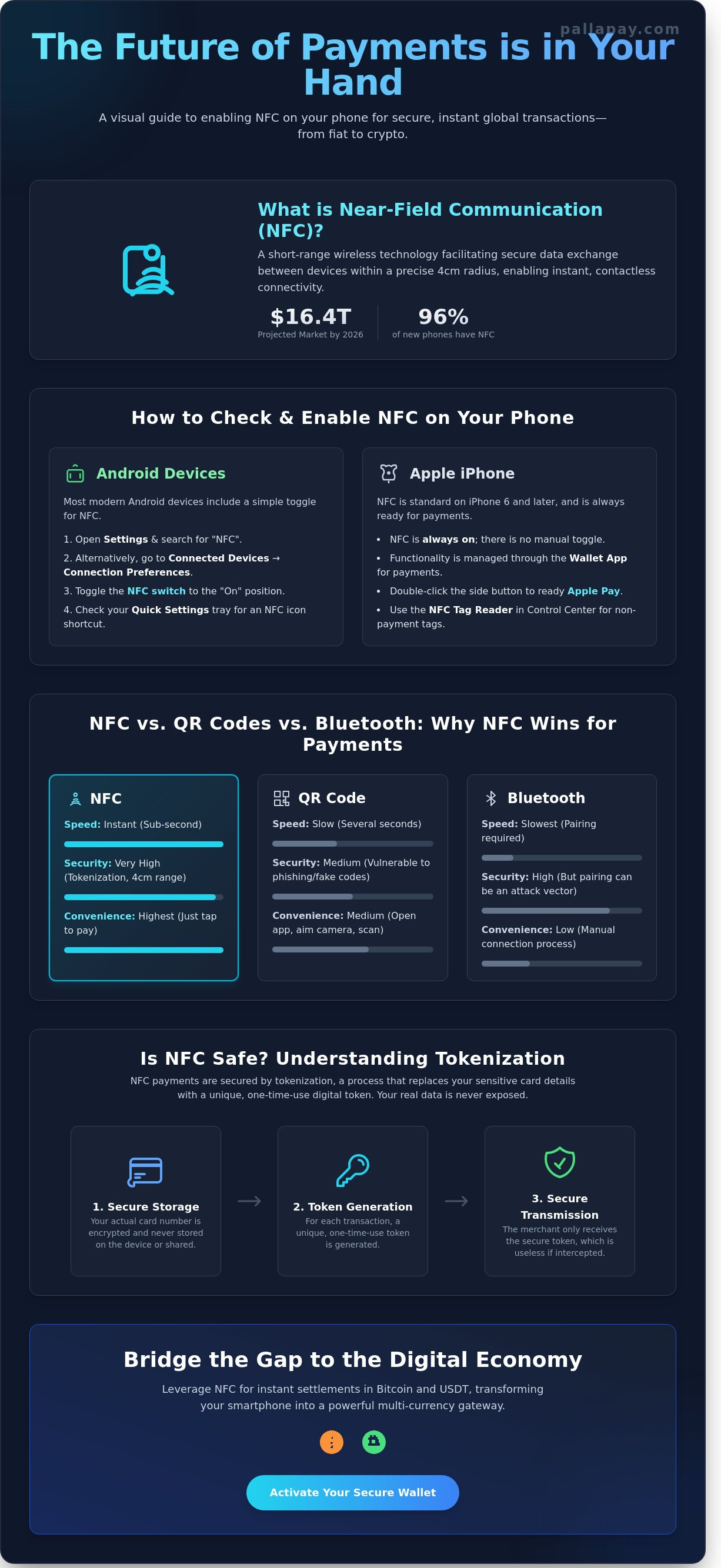
Understanding Near-field communication (NFC) is the first step toward modernizing your financial interactions. This short-range wireless technology facilitates secure data exchange between devices within a precise 4cm radius. By 2026, the global smartphone market has matured to a point where approximately 96% of mid-range and flagship devices released after 2020 include this hardware as a standard utility. It’s no longer a niche feature; it’s a fundamental component of the global fintech ecosystem that enables instant, contactless connectivity.
Verifying the presence of nfc on this phone is a straightforward process that begins in your device’s core software settings. While older handsets from the mid-2010s occasionally featured physical “NFC” branding on the battery or rear casing, modern aesthetics favor a clean, unibody design. Consequently, digital verification is the most reliable method. The fastest way to confirm compatibility is to use the search bar within your settings menu. Simply typing “NFC” will immediately reveal if the hardware is integrated into your system architecture.
The 2026 standard dictates that almost all reputable manufacturers prioritize this technology to support the massive shift toward digital wallets. If your device was manufactured within the last five years, it almost certainly possesses the necessary silicon. This hardware serves as the professional bridge between your physical device and the digital economy, handling the heavy lifting of secure data transmission during a transaction.
Checking NFC on Android Devices
Android users can confirm their hardware status by navigating to Settings, then selecting Connected Devices, and finally Connection Preferences. If the hardware is present, an NFC toggle will appear in this menu. For a faster verification, swipe down twice from the top of the screen to access the Quick Settings tray. Look for the NFC icon among the shortcuts. If it’s missing, your device likely lacks the required chip. This is increasingly rare for hardware released after the 2021 production cycle, as manufacturers now view NFC as an essential tool for business growth and consumer convenience.
Checking NFC on iPhone (iOS)
Apple has integrated NFC into every model since the iPhone 6, which debuted in 2014. On modern iOS versions, the technology operates silently in the background for system functions like Apple Pay. You won’t find a manual toggle to disable it, as it’s designed to be always on for seamless utility. To interact with non-payment tags, you can use the NFC Tag Reader found in the Control Center. This integration ensures that users are always prepared for the future of payments without requiring complex manual configurations or technical expertise.
Step-by-Step: How to Enable and Manage NFC Settings
Activating the internal hardware is the foundational step toward a modern, contactless lifestyle. While most devices manufactured after 2022 include this technology by default, the software layer requires precise configuration to ensure security and speed. Once you verify the presence of nfc on this phone, you can transform the device into a secure gateway for global commerce. This process bridges the gap between your physical device and the digital economy.
Enabling NFC on Modern Android Versions
Android provides a high level of granular control over how your device interacts with payment terminals and data tags. To begin, navigate to the Settings menu and select “Connected Devices,” then tap “Connection Preferences.” Toggle the NFC switch to the “On” position for instant availability. This action enables the hardware to broadcast and receive signals within a four-centimeter range. It’s a simple toggle that unlocks a global network of utility.
- Set Default Payment App: Inside the NFC menu, tap “Contactless Payments.” Select your preferred wallet to ensure it takes priority at any point-of-sale terminal.
- Enable Contactless Payments: Ensure the specific sub-setting for payments is active; this adds a vital layer of encryption to your transaction data.
Choosing a reliable provider like the Pallapay Wallet allows you to manage digital assets with the same ease as traditional currency. This ensures that your preferred financial tool is always ready when you tap.
Managing iOS for Payments and Tags
Apple integrates NFC deeply into its ecosystem, focusing on a seamless user experience. You don’t need to toggle a master switch; instead, you manage functionality through the Wallet app. Ensure your credentials are verified and ready for use. On iPhone XS and all subsequent models, “Background Tag Reading” is always active. This allows the phone to scan NFC tags in posters or retail displays without requiring you to open a specific application first.
When you’re ready to pay, double-click the side button. This action puts the NFC chip into a “ready” state, allowing for an instant handshake with the terminal. It’s a secure, efficient process that represents the future of payments.
Troubleshooting and Optimization
If nfc on this phone fails to trigger, the cause is usually physical or power-related. Battery saver modes frequently disable the NFC antenna to extend device longevity; check your power settings if the chip seems unresponsive. Additionally, heavy-duty metal cases can shield the radio frequency. A 2024 study indicated that thick metallic layers can reduce signal strength by up to 85%, preventing successful data exchange. For the best results, ensure your device is running the latest firmware to maintain compatibility with global payment standards.
Optimizing your mobile setup is just the beginning. You can also empower your business by integrating a crypto POS machine to accept instant, secure transactions from any NFC-enabled device.
NFC vs. QR Codes vs. Bluetooth: Why NFC Wins for Payments
NFC technology represents the pinnacle of transactional efficiency in the modern financial landscape. While QR codes gained traction due to low hardware barriers, they cannot match the sub-second speed that institutional commerce demands. A typical NFC transaction completes in under 300 milliseconds. This is a significant leap over QR-based systems, which require a user to unlock their device, navigate to a specific app, and wait for the camera to calibrate. When you verify the presence of nfc on this phone, you’re accessing a system designed for instant utility.
Connectivity is another critical differentiator. QR codes often rely on the user’s ability to fetch data from a cloud server in real-time. If you’re in a basement parking lot or a crowded stadium with poor cellular reception, a QR payment will likely fail. NFC operates independently of the user’s data connection. It executes a secure handshake locally between the device and the terminal, ensuring that payments remain seamless regardless of network availability. This reliability has made it the non-negotiable standard for retail stores and high-volume public transit systems globally.
To support these high-volume environments with reliable hardware and payment processing, learn more about specialized solutions for modern retail businesses.
Security architecture remains the strongest argument for NFC. The 4cm operating range isn’t a limitation; it’s a deliberate security feature. This physical proximity requirement ensures that a transaction only occurs through intentional action, effectively neutralizing the risk of long-range data interception that plagues other wireless protocols.
The Short-Range Advantage
The proximity requirement of NFC serves as a hardware-level firewall against unauthorized skimming. Unlike Bluetooth (BLE), which can remain discoverable over several meters, NFC’s signal dissipates almost immediately beyond its 4cm radius. Power consumption also favors NFC. A standard NFC controller uses approximately 40mA during an active transaction, while Bluetooth requires constant power to maintain a discovery state. This efficiency is why the technology is the preferred choice for hotels implementing keyless entry, as it provides a secure, low-energy solution for guest access.
User Experience in Retail Environments
NFC provides a frictionless experience that removes the traditional barriers of digital payments. There’s no need to wake the screen or open a camera; the transaction triggers automatically when the device nears the reader. This simplicity is backed by rigorous global standardization. Because nfc on this phone adheres to the ISO/IEC 14443 standard, your device will function with any compliant terminal in any country. The ISO/IEC 14443 protocol stands as the universal benchmark for secure, high-speed data exchange in the global contactless payment ecosystem.
Is NFC Safe? Understanding Encryption and Tokenization
Security concerns often arise when users first explore the capabilities of nfc on this phone. A common myth suggests that digital pickpockets can steal your credit card details simply by walking past you with a hidden reader. This scenario is technically impossible in 2026. NFC technology operates on a short-range frequency of 13.56 MHz, requiring the device to be within four centimeters of a terminal to initiate a handshake. Proximity alone isn’t enough; the transaction requires an active encrypted exchange that a passive observer cannot replicate.
The primary defense mechanism is tokenization. When you tap your device at a terminal, your actual credit card number or private crypto keys are never transmitted. Instead, the system generates a unique, one-time digital token for that specific transaction. If a malicious actor intercepted this data, the token would be useless for any other purchase. This ensures your sensitive financial identity remains shielded during every interaction.
Biometric layers provide a secondary tier of absolute security. Most modern devices require FaceID, a fingerprint, or a secure PIN before the NFC controller activates. This multi-factor approach means that even if your device is lost or stolen, your funds remain inaccessible to unauthorized parties. It’s a sophisticated bridge between hardware protection and user intent.
The Role of the Secure Element (SE)
Your device contains a dedicated, tamper-resistant chip known as the Secure Element. This hardware is physically isolated from the rest of the phone’s operating system. Because the SE operates independently, malware or viruses on your phone cannot “see” or extract your financial data. Tokenization replaces sensitive financial data with a one-time use digital identifier, ensuring your primary account number remains invisible to the merchant. This isolation is why mobile payments are often considered more secure than traditional plastic cards, which expose your static card number during every swipe. This architecture facilitates the Instant settlement processes that define The Future of Payments.
Practical Security Tips for Users
Maintaining a secure mobile environment requires a few proactive habits. Use these steps to ensure your transactions remain private and protected:
- Always configure your settings to require biometric authentication for every NFC transaction.
- Keep your operating system updated to the latest security patch to defend the NFC controller against new vulnerabilities.
- Learn how to spend cryptocurrency safely by using hardware-backed digital wallets.
- Monitor your transaction history regularly through your wallet app to identify any unauthorized activity immediately.
By combining hardware-level encryption with smart user habits, nfc on this phone becomes the most reliable tool in your financial arsenal. Experience seamless global commerce by downloading the secure Pallapay wallet today.
The Future of NFC: Crypto POS and Instant Global Settlements
NFC technology has transitioned from a simple data transfer tool into the primary backbone of global finance. By 2026, the widespread adoption of digital assets like Bitcoin and USDT has made physical cards nearly obsolete for the modern consumer. Having nfc on this phone is no longer just about convenience; it’s about participating in a borderless economy that operates 24/7. This technology bridges the gap between decentralized blockchain assets and the physical point of sale, allowing for a level of financial fluidity that was previously impossible.
The Pallapay ecosystem leads this transformation by connecting institutional-grade liquidity with everyday hardware. When you use nfc on this phone to complete a transaction, you’re leveraging a sophisticated network designed for absolute security and speed. This infrastructure ensures that every “Tap-to-Pay” action is backed by real-time processing, effectively turning your mobile device into a comprehensive financial command center.
Accepting Crypto via NFC
Businesses are rapidly moving away from traditional, restricted banking systems. By utilizing a Crypto POS Machine, merchants can transform any NFC-enabled smartphone into a multi-currency terminal. This setup allows for the instant acceptance of digital assets directly from a customer’s mobile wallet. In 2026, industry data shows that over 85% of retail transactions in major financial hubs are contactless, making this integration a necessity for growth.
One of the primary concerns for merchants has always been market volatility. Pallapay solves this through automated fiat settlement options. When a customer pays in crypto via NFC, the merchant can choose to receive the equivalent value in their local currency immediately. This process eliminates the risk of price fluctuations and ensures that businesses can manage their accounting with traditional stability while benefiting from modern technology.
Instant Transactions with Pallapay
The synergy between NFC hardware and the Pallapay payment API provides developers and enterprises with a powerful toolkit for global spending. The Pallapay Mastercard integrates directly with your phone’s digital wallet, allowing for instant conversion and spending of crypto balances at millions of locations worldwide. There’s no longer a need to wait for exchange approvals or bank transfers; the transaction happens in the time it takes to tap your device.
Your phone’s NFC chip is the definitive key to the future of payments. It’s a secure, instant, and borderless solution that empowers both the individual and the enterprise. As we move through 2026, the reliance on physical leather wallets will continue to fade. In their place stands a unified digital ecosystem where Pallapay handles the complex heavy lifting of technology behind the scenes, leaving you with a seamless payment experience.
Master the New Era of Contactless Commerce
As digital finance accelerates throughout 2026, mobile connectivity has transitioned from a simple convenience into a vital financial tool. Mastering the settings for nfc on this phone ensures you’re prepared for a global economy that prioritizes tokenized encryption over vulnerable physical hardware. This technology offers a secure, instant bridge between digital liquidity and daily transactions. By utilizing NFC, you gain access to a standard of speed and safety that QR codes and Bluetooth simply cannot match in a high-stakes retail environment.
Pallapay stands at the forefront of this transition as a regulated Money Services Business (MSB) in both the United States and Canada. Our established presence in financial hubs like Dubai, Singapore, and Istanbul allows us to facilitate instant crypto-to-fiat settlements for merchants worldwide. We manage the complex technical integrations so your business can enjoy the benefits of a borderless financial ecosystem without the traditional wait times. It’s time to leverage professional-grade tools that turn your smartphone into a powerful global gateway.
Experience the Future of Payments with Pallapay’s NFC Solutions
Your journey toward seamless, secure, and instant global transactions starts now.
Frequently Asked Questions
How do I know if my phone has NFC without checking settings?
You can identify if you have nfc on this phone by looking for the universal N-Mark logo on the device’s rear casing or checking the original retail packaging. Since 2019, approximately 90 percent of premium handsets come equipped with this hardware to facilitate instant data exchange. If your device features a glass or high-grade plastic back, the antenna is usually located near the camera module to ensure a seamless connection during transactions.
Can I use NFC to pay if my phone is dead?
You can often use NFC for transit or payments even if your battery reaches zero percent. Specific models like the iPhone 15 provide a power reserve that maintains NFC functionality for five hours after the main system shuts down. This backup ensures you’re never stranded; it provides a secure bridge between hardware limitations and your essential financial needs. It’s a critical safety feature for the modern commuter.
Is NFC the same as Bluetooth?
NFC and Bluetooth serve different roles in the global fintech ecosystem. While Bluetooth facilitates long-range data transfer, NFC operates at a frequency of 13.56 MHz and requires a proximity of less than 4 centimeters. This short range makes NFC the superior choice for secure payments, as it prevents accidental connections. It provides an instant link that’s far more efficient for point-of-sale interactions than traditional pairing methods.
Can I pay with Bitcoin using NFC on my phone?
You can pay with Bitcoin using nfc on this phone by utilizing an all-in-one payment gateway that converts crypto to liquidity in real time. By 2026, over 100 million merchants globally will accept these contactless transactions through integrated wallets. This technology handles the complex settlement process behind the scenes, allowing you to use your digital assets for daily purchases with the same speed as a traditional debit card.
What should I do if NFC is not working on my phone?
If your transaction fails, verify that the NFC feature is toggled on in your device’s connection menu. Thick or metallic cases often block the signal, as metal can reduce transmission efficiency by 100 percent. Ensure your phone is within 4 centimeters of the reader. If the problem persists, a quick restart usually clears the software cache, restoring the seamless performance required for instant global payments.
Does using NFC drain my battery quickly?
Using NFC doesn’t drain your battery in any noticeable way. The chip remains in a passive state, consuming less than 0.5 percent of total power over a 24-hour period. It only draws significant energy during the fraction of a second it takes to complete a transaction. This efficiency makes it the ideal tool for the future of payments, providing constant availability without compromising your device’s operational longevity.
Is it possible for someone to steal my data via NFC in a crowd?
Stealing data via NFC in a crowd is virtually impossible due to the 4-centimeter proximity requirement. Every transaction uses a unique, encrypted token rather than your actual card details, ensuring your financial data remains secure. This architecture prevents skimming attacks that were common with older magnetic stripe technology. You can move through high-traffic areas with total confidence in the stability and security of your digital wallet.
Do I need an internet connection to use NFC payments?
You don’t need cellular data or Wi-Fi to complete an NFC payment at a retail terminal. The phone and the reader communicate locally using electromagnetic fields to exchange encrypted tokens. While most digital wallets allow up to 10 offline transactions before requiring a sync, the core process remains independent of the cloud. This ensures you can enjoy a seamless payment experience even in remote locations or underground transit stations.
Disclaimer
The information provided on this website and blog is for general informational and educational purposes only and does not constitute financial, investment, legal, tax, or other professional advice.
Cryptocurrency and digital asset services may be subject to regulatory restrictions in certain jurisdictions. Users are solely responsible for ensuring compliance with applicable local laws and regulations before using any products or services mentioned on this website.
PallaPay does not guarantee the accuracy, completeness, or timeliness of any information published and accepts no liability for any loss or damages arising from reliance on the content. Any opinions expressed are those of the respective authors and may change without notice.
Certain services, features, or products referenced may be provided through third-party partners, licensed entities, or affiliated service providers subject to separate terms and regulatory approvals. Availability of services may vary by country or region.
This website may contain references to digital assets, virtual currencies, or blockchain-related services that are not available to residents of certain jurisdictions, including where prohibited by law. Nothing on this website constitutes an offer, solicitation, or recommendation to buy or sell any financial instrument or virtual asset.